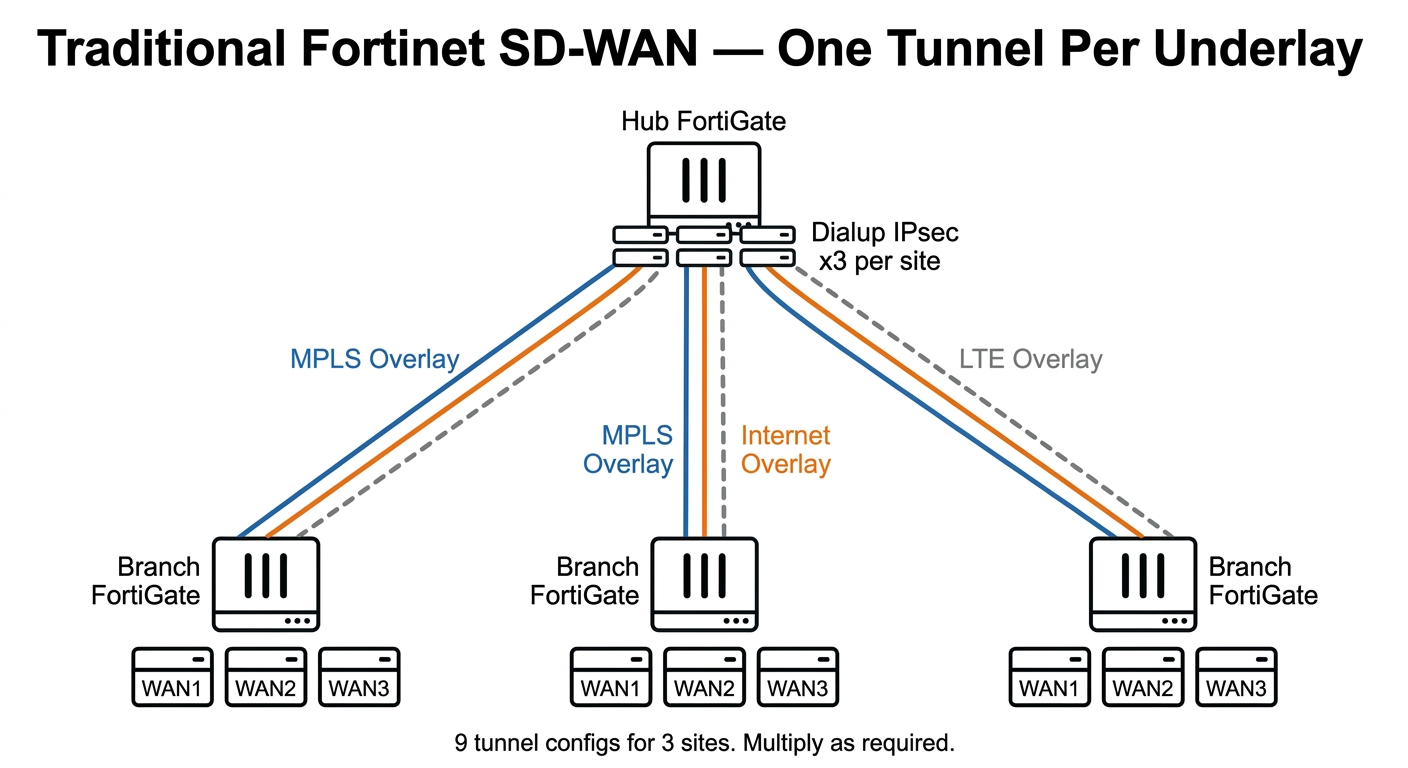
If you've built Fortinet SD-WAN for any length of time, you know the ritual. MPLS underlay gets a tunnel. Broadband gets a tunnel. LTE gets a tunnel. Each one needs its own phase 1, phase 2, health check, and SD-WAN member. Three tunnels per spoke. The hub side is clean enough — you configure shared dial-up server interfaces per overlay type, and those don't multiply with spoke count. But the spoke side does. Ten sites means thirty tunnel configs to name, thirty health checks to tune, and thirty sets of SD-WAN members to maintain. By the time you're at twenty sites, a spreadsheet starts to feel like a career choice.
This isn't a design flaw. It's deliberate. Each tunnel is a distinct SD-WAN member, and that granularity is exactly what gives you control. When Teams calls start sounding like a dial-up modem, your SLA monitor fires and the SD-WAN rule moves VoIP off the congested broadband and onto MPLS. Clean, predictable, auditable.
FortiOS 8.0 starts nudging this model. Not replacing it. Nudging it. Two specific changes are worth understanding properly, because the marketing around them isn't always helpful.
FIRST, WHAT RFC 8229 ACTUALLY IS
RFC 8229 crops up in the FortiOS 8.0 conversation. Read the RFC before the marketing copy muddies it.
RFC 8229 defines TCP Encapsulation of IKE and IPsec Packets. One problem, one solution. UDP gets blocked by a middlebox (carrier-grade NAT, hotel captive portal, corporate proxy) and your IPsec tunnel dies without a meaningful error. RFC 8229 wraps the IKE negotiation and ESP data inside TCP. The middlebox sees TCP traffic and waves it through. Sorted.
What it does not do: define multiple Security Associations per tunnel. The spec is explicit. One TCP connection per IKE SA. Multiple IKE SAs cannot share a connection (except briefly during rekeying). The "single overlay over multiple underlays" story you might have read about is a different feature, and we'll get to it. RFC 8229 is a transport escape hatch, nothing more.
Fortinet has supported RFC 8229 since FortiOS 7.4. Two caveats that haven't changed: IKEv2 only, and ADVPN doesn't work with it. If your deployment relies on ADVPN spoke-to-spoke shortcuts, TCP encapsulation is not available on those tunnels. File that one away. It comes back up later.
RFC 8229 was obsoleted by RFC 9329 in 2022. Fortinet's implementation predates that, and whether the FortiOS 8.0 TLS feature aligns with RFC 9329 or is a vendor extension on top of 8229 isn't yet confirmed in published documentation.
WHAT FORTIOS 8.0 ADDS: TLS 1.3 OVER TCP
FortiOS 8.0 takes the RFC 8229 foundation and adds a third transport option: TLS 1.3 wrapped around the TCP connection. The progression over three versions looks like this:
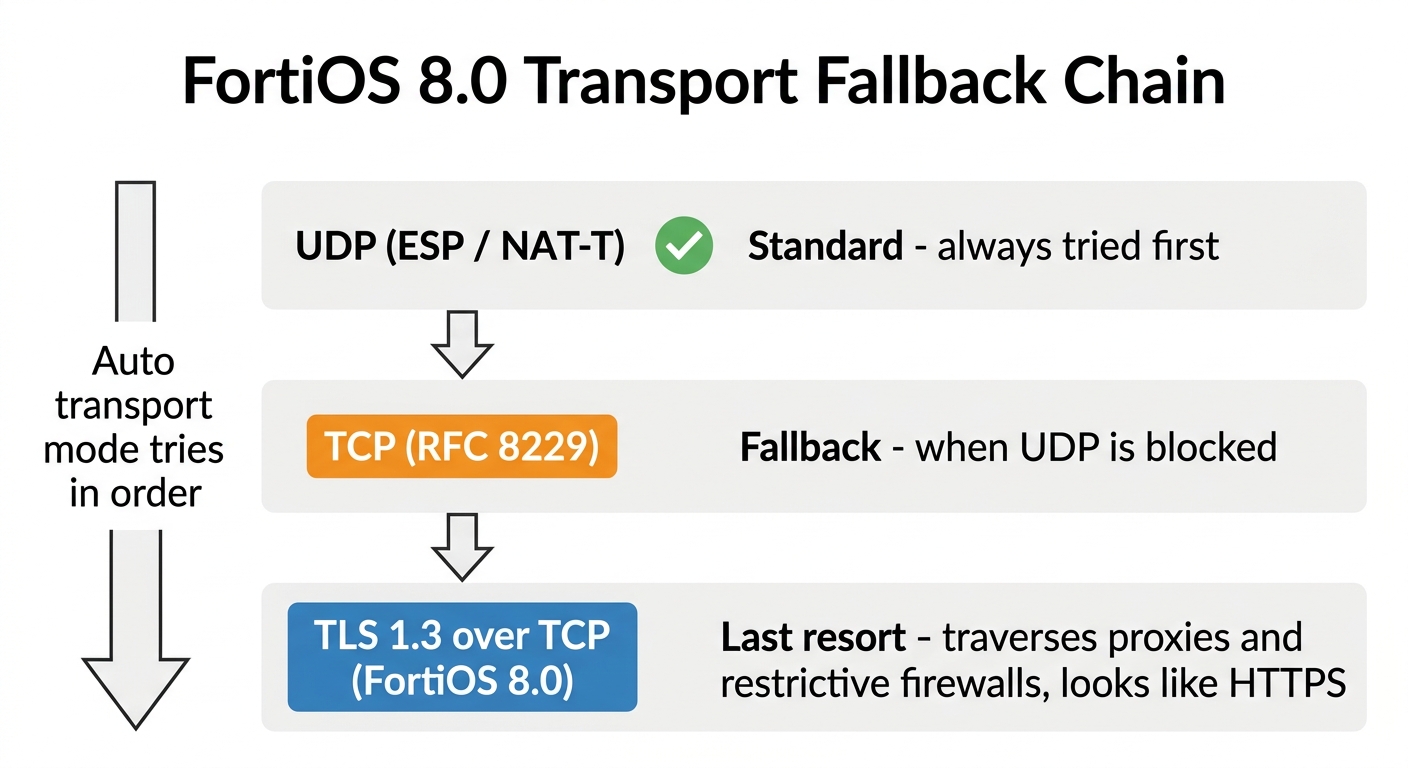
Raw TCP alone (RFC 8229) still gets blocked in some environments. A corporate HTTPS inspection proxy will kill a TCP connection on a non-standard port the moment it can't identify what's inside it. TLS 1.3 on port 443 looks like HTTPS. Most proxies pass it. Some inspect it, find ESP frames inside, and drop it too. That's a smaller problem population than "all UDP is blocked."
Configuration is per-VDOM:
config system settings
    set ike-tcp-service enable
    set ike-tls-service enable
end
Set the tunnel transport to Auto and the FortiGate works through the chain. UDP first. TCP if UDP gets no response. TLS 1.3 if TCP fails. Your existing UDP tunnels carry on as normal. The fallback only fires when the primary negotiation times out.
What to watch out for:
- FortiClient endpoints cannot use TLS-based VPN over TCP in 8.0. Site-to-site and dial-up between FortiGate devices only. If you're planning to use it for remote user tunnels, you can't in this release.
- Static Auto VPNs revert to UDP after upgrade. Fortinet adjusts existing configs on upgrade, but static Auto VPNs get pushed back to UDP transport. Audit your tunnels post-upgrade and confirm everything is up before closing the change window.
- TLS encapsulation has overhead. On software-based FortiGates the performance hit is measurable. On NP7-equipped hardware it offloads. Know which you're running before enabling TLS as a standard fallback on high-throughput tunnels.
- ADVPN still doesn't work with TCP or TLS transport. No change from 7.4. If you have ADVPN running, these transport options aren't available on those tunnels.
THE BIGGER STORY: MULTIPATH IPSEC
Fortinet flags multipath IPsec as a new feature in the 8.0 press release, and it's the one that changes the architecture conversation.
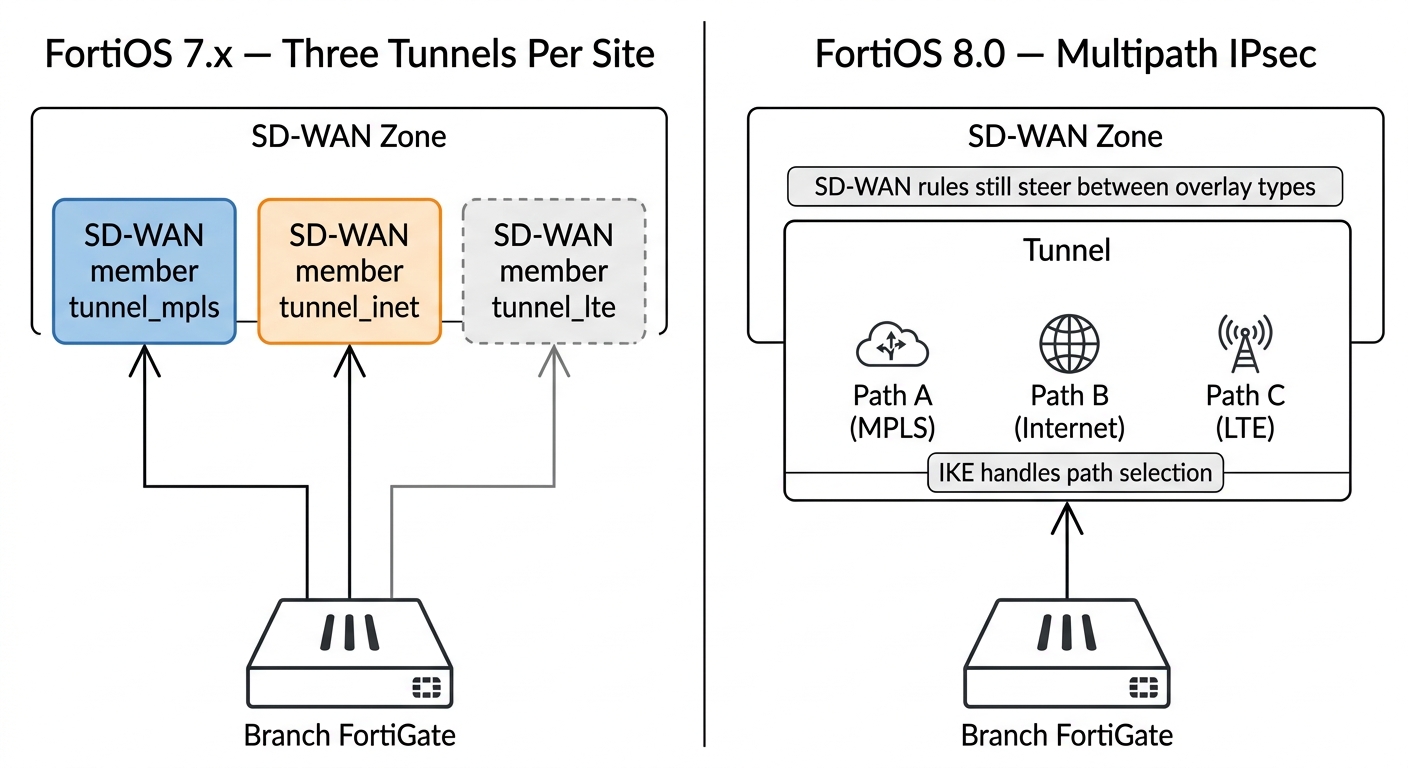
Multipath IPsec allows a single IKE SA to establish and maintain paths across multiple physical interfaces at the same time. Instead of one tunnel per WAN interface, you get one logical tunnel with multiple paths inside it. The IKE layer manages which physical path carries the traffic.
Why move redundancy to the IKE layer?
In the traditional model, failover goes through the SD-WAN loop. Health check probe times out. SLA threshold breaches after N consecutive failures. SD-WAN rule re-evaluates. Traffic steers to the backup member. With default probe settings, this takes somewhere between three and ten seconds depending on your interval and threshold config. During that window you're dropping packets. For VoIP or real-time video, three seconds is a noticeable gap.
IKE knows about path failure at the SA level, before the SD-WAN health check loop has started counting. Dead Peer Detection operates as part of the IKE handshake. When a physical path fails, the IKE layer shifts to a surviving path faster than the SD-WAN layer can respond. The intent is that established sessions survive the transition rather than resetting. Fortinet's full technical documentation for this feature isn't published yet, so test session continuity in a lab before relying on it for latency-sensitive traffic.
The second benefit is per-spoke configuration reduction. Two MPLS circuits to the same hub currently means two tunnel configs on the spoke, two SD-WAN members, two health checks, and duplicate firewall policy references. Multipath IPsec collapses that into one tunnel config and one SD-WAN member per spoke. At the hub you go from monitoring sixty active IKE SA instances (thirty spokes across two overlay types) down to thirty, one per spoke.
BUT WHAT ABOUT SD-WAN RULES?
The obvious concern when you hear "one tunnel instead of two" is losing the granular control your SD-WAN rules depend on. If Teams calls and overnight backup jobs both share the same tunnel member, how do you route one to low-latency MPLS and the other to cheap broadband?
Multipath IPsec and SD-WAN rules work at different levels. They don't replace each other.
SD-WAN rules steer between overlay types. MPLS class versus Internet class versus LTE class. That layer doesn't change. Multipath IPsec changes what happens inside a single overlay type.
The mental model is link aggregation. You don't write routing rules for individual physical ports in a LAG. The bond interface handles redundancy and the routing layer sees one interface. Multipath IPsec is the same abstraction, one layer up. Your SD-WAN rule still says "VoIP prefers MPLS zone, latency threshold 20ms, fail to Internet zone." If you have two MPLS circuits, the MPLS zone now contains one multipath tunnel rather than two separate members. The IKE layer manages which physical circuit carries the traffic inside that zone.
Where you lose granularity: if your two WAN links have different characteristics (10ms MPLS versus 40ms broadband, guaranteed bandwidth versus best-effort) and you want to steer specific applications to specific physical paths, you still want separate SD-WAN members. Multipath IPsec is a redundancy tool, not a differentiated QoS tool. The IKE layer will load balance or fail over between paths but won't route Teams calls to the low-latency path and backup jobs to the cheap one.
FortiOS 8.0 partly addresses this gap. Spokes now communicate per-tunnel egress shaping values to the hub during IKEv2 negotiation, so the hub knows what each spoke's uplink can handle without manual configuration. Combined with new bandwidth-based SD-WAN hash modes (you can steer by real underlay bandwidth, not just overlay SLA metrics), the stack gets smarter about path selection. That said, it's not the same as writing explicit per-application rules that reference individual physical paths.
WHERE THIS CHANGES YOUR DEPLOYMENTS (AND WHERE IT DOESN'T)
One of each link type per site: changes nothing. One MPLS, one broadband, one LTE at each branch means nothing to aggregate. The traditional three-tunnels-per-spoke model is still correct here. Your SD-WAN rules already handle steering between three distinct link types and multipath IPsec adds nothing. Don't fix what isn't broken.
Dual circuits of the same type: dual MPLS from different carriers, dual Internet feeds, two 4G SIMs. Today these are separate SD-WAN members with separate maintenance overhead on every spoke. With multipath IPsec they become one logical tunnel with faster failover and half the spoke-side config. For these sites the upgrade is a concrete improvement.
Hub locations: benefit most. A hub FortiGate connecting to thirty spoke sites where each spoke has two WAN links currently tracks sixty active IKE SA instances across two overlay types. With multipath IPsec those become thirty. Hub monitoring and troubleshooting simplifies because you're tracking one tunnel state per spoke rather than one per underlay per spoke.
Sites with problematic UDP paths: the TLS 1.3 transport feature is useful here. 4G providers in some regions drop UDP after a period of inactivity. Carrier-grade NAT with aggressive timeout tables kills IPsec keepalives. With Auto transport, the tunnel renegotiates over TLS 1.3 and keeps working. No architectural changes required. Enable the two VDOM settings and set tunnel transport to Auto.
THINGS TO CHECK BEFORE YOU UPGRADE
- ADVPN compatibility with multipath IPsec. ADVPN and TCP/TLS transport have been incompatible since 7.4. The interaction between ADVPN and the multipath IPsec feature isn't fully documented yet. If you're running ADVPN spoke-to-spoke shortcuts, test this in a lab before rolling 8.0 into production. Don't assume compatibility.
- Hardware model support. Fortinet's more significant feature releases often carry per-platform caveats. Multipath IPsec may be limited to NP7-equipped hardware or excluded from entry-level FG-40F and 60F models. Check the FortiOS 8.0 supported features matrix for your hardware before building a deployment around it.
- IKEv1 tunnels. RFC 8229, TLS over TCP, and multipath IPsec all require IKEv2. FortiOS 8.0 also defaults to showing only recommended IKE proposals in the GUI, hiding IKEv1 options by default. If you have IKEv1 tunnels to third-party equipment, audit these before upgrading and confirm your proposals are set explicitly.
- Post-upgrade tunnel audit. The upgrade process adjusts TCP VPN transport settings on existing tunnels. Static Auto VPNs revert to UDP, dynamic TCP tunnels get ike-tcp-service enabled. Run a tunnel status check after upgrading and verify everything is up before signing off the change.
- Performance testing on TLS transport. TLS 1.3 encapsulation adds CPU overhead on software-forwarding platforms. If you enable it as a standard fallback on a site with significant throughput, test the performance impact on your specific hardware before rolling it across the estate.
THE BOTTOM LINE
FortiOS 8.0 leaves the Fortinet SD-WAN playbook intact. Hub-spoke topology, SD-WAN zones, SLA health checks, and application-based steering rules all work as they did. What changes is what the layer below SD-WAN can do.
TLS 1.3 over TCP means you can build a reliable tunnel over networks that would have killed UDP without explanation. Sites with restrictive carrier NAT, 4G paths that drop UDP, locations behind corporate HTTPS proxies — these become viable underlays with a VDOM setting change and no architecture rework.
Multipath IPsec means that if you have redundant circuits of the same type, you no longer need to expose each one as a separate SD-WAN member and carry the per-spoke config overhead that comes with it. The IKE layer handles redundancy inside the overlay, and SD-WAN focuses on steering application traffic between classes of service.
Whether either feature is useful right now depends on your specific sites. If you're running dual circuits anywhere, have sites where UDP tunnels have been unreliable, or manage hub configs that have grown to an uncomfortable size, FortiOS 8.0 is worth a proper look.
If you want to talk through how these changes affect your current Fortinet deployment, get in touch. We do this for a living.