Every network eventually needs a firmware upgrade. Security patches, bug fixes, new features — they all require a software reload. On a traditional single-chassis switch, that means downtime. On a mission-critical network, that means a change window, an out-of-hours callout, a rollback plan, and a nervous wait.
It doesn't have to be that way. If ISSU (In-Service Software Upgrade) is factored into your network design from day one, you can upgrade switches with minimal service disruption.
The catch? ISSU isn't something you can bolt on after the fact. It's a design decision. And if it's not considered at the architecture stage, retrofitting it later means re-cabling, re-designing, and potentially replacing hardware. This post explains what ISSU is, what your network needs to look like to support it, and why it should be on your design checklist for any network where uptime matters.
WHAT IS ISSU?
ISSU is a mechanism that allows you to upgrade the operating system on a network switch or router while the device continues forwarding traffic. Instead of a full reload that takes the device offline, ISSU performs a rolling upgrade across redundant hardware — one member at a time — so there's always an active path for data.
The key requirement is redundancy. ISSU relies on having two or more switches operating as a single logical unit (a virtual chassis, stack, or HA pair), with dual-homed connectivity from downstream devices. Without that physical redundancy, there's nothing to fail over to during the upgrade — and that's why it needs to be a design consideration, not an afterthought.
DESIGNING FOR ISSU
This is the most important section. ISSU capability is determined at the design stage — by the hardware you select, the topology you build, and the way you cable it. Here's an exmaple what needs to be in place:

- Redundant chassis at core/distribution — at minimum, two switches operating as a virtual chassis, stack, or HA cluster. This is your ISSU-capable pair
- Dual-homed downstream connections — every device connecting to that pair needs physical links to both members, typically bonded via LACP (link aggregation). If a device only has a single uplink to one member, it loses connectivity when that member reloads
- Sufficient port density — dual-homing means twice the uplink ports on both sides. This has real cost implications: more SFPs, more cabling, potentially higher-spec switches. Factor this into the BOM at design stage, not as a surprise later
- ISSU-compatible platform and firmware — not every switch model or firmware version supports ISSU. Confirm compatibility before you spec the hardware, not after it's racked
The cost trade-off is worth understanding clearly: designing for ISSU does cost more upfront. But that same dual-chassis, dual-homed topology also gives you hardware fault tolerance and higher aggregate bandwidth in normal operation. You're not just paying for an upgrade mechanism — you're getting a fundamentally more resilient network. The ISSU capability comes as a bonus on top of a design that's already best practice for any mission-critical environment.
Conversely, if you design a core or distribution layer with single switches and single uplinks, you've locked yourself out of ISSU for the life of that hardware. Every firmware upgrade will require an outage window, and every critical security patch will sit in a queue waiting for approval.
HOW ISSU WORKS
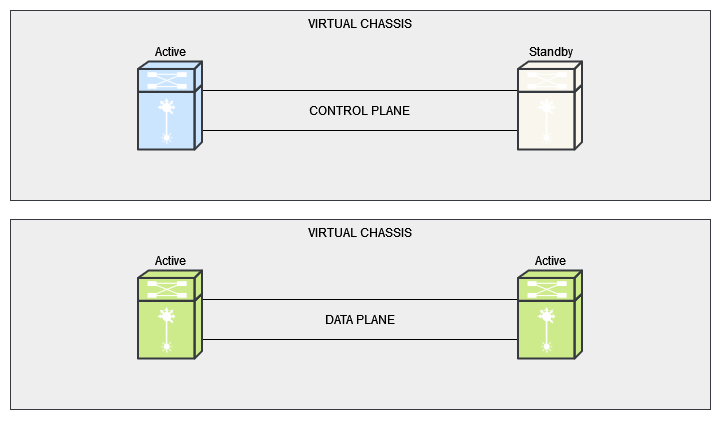
The most common ISSU implementation uses a virtual chassis (or equivalent stacking technology) where two physical switches operate as a single logical device. Using Alcatel-Lucent Enterprise Virtual Chassis as a practical example:
Virtual Chassis Fundamentals
- Single management plane — the two switches are managed as one device with a single IP, single config, and single CLI session
- LACP across both members — link aggregation groups can span both physical chassis, so a single LAG has links to each member
- State synchronisation — ARP tables, MAC address tables, and routing tables are continuously synchronised between the primary and standby members
- No STP dependency — unlike traditional VRRP/HSRP designs where spanning tree blocks redundant paths, virtual chassis uses all links actively
The Upgrade Process
At a high level, an ISSU follows this sequence:
- Stage the new firmware — load the new software image onto the primary member. Some vendors provide specific ISSU-compatible image packages, so check before you start
- Reload the primary member — using the vendor's ISSU commands, the primary switch reloads with the new firmware. Before it goes down, state information (ARP, MAC, routing tables) is synchronised to the standby member, which takes over all forwarding and control plane operations
- Primary comes back online — once the primary has rebooted on the new firmware, it re-joins the virtual chassis and resumes forwarding
- Upgrade the secondary — the same process is repeated for the standby member, with the newly-upgraded primary now handling all traffic
Throughout this process, downstream devices with LACP links to both chassis members simply steer traffic to whichever member is currently active. From the perspective of connected devices and end users, there is no outage.
Data Plane vs Control Plane
Understanding the role of each plane during ISSU helps explain why it's non-disruptive:
The data plane handles the actual forwarding of packets. When one chassis member reloads, the data plane operations shift entirely to the remaining member. Because LACP distributes traffic across links to both members, the remaining member simply absorbs the full forwarding load.
The control plane manages the upgrade coordination — synchronising state tables before the reload, managing the role transition between primary and standby, and ensuring the returning member re-joins cleanly. This state synchronisation is what makes the upgrade genuinely non-disruptive rather than just a fast failover with a brief blip.
WHICH VENDORS SUPPORT ISSU?
ISSU isn't unique to one vendor — most major enterprise switching platforms offer some form of it, though the naming and specific implementation details vary:
- Alcatel-Lucent Enterprise — ISSU via Virtual Chassis on OmniSwitch 6860, 6900, and 9900 series
- Cisco — ISSU on platforms supporting VSS (Virtual Switching System), StackWise Virtual, and certain Nexus deployments with vPC
- Juniper — NSSU (Non-Stop Software Upgrade) on Virtual Chassis and dual Routing Engine platforms; ISSU on high-availability MX/EX series
- Aruba/HPE — VSF (Virtual Switching Framework) supports rolling upgrades across stacked members
- Fortinet — HA (high availability) pairs support firmware upgrades with minimal disruption via session failover between active and standby units
The specific firmware versions, platform models, and prerequisites vary by vendor. Always verify ISSU support in the release notes for your specific hardware and target firmware version before planning an upgrade.
WHY THIS SHOULD BE ON YOUR DESIGN CHECKLIST
If you're designing a new network — or refreshing an existing one — here's why ISSU capability deserves a line item on the design document:
- No more outage windows for routine upgrades — a critical bug fix or security patch shouldn't have to wait weeks for the next approved maintenance slot. ISSU lets you upgrade during business hours with no service impact
- Faster response to security vulnerabilities — when a CVE drops that affects your core switches, ISSU means you can patch the same day rather than accepting the risk while a change request works its way through the approval process
- Reduced operational overhead — no after-hours maintenance, no late-night change calls, no rollback anxiety. Upgrades become a routine operational task rather than a planned event with a war room
- Resilience you get for free — the same dual-chassis, dual-homed design that enables ISSU also protects you against hardware failures, PSU failures, and link failures in normal operation. You're not adding complexity for ISSU — you're building a properly resilient network that happens to also support non-disruptive upgrades
- Longer useful life from your hardware — networks that can be upgraded without disruption stay current. Networks that can't tend to fall behind on firmware because nobody wants to schedule the outage — and that's how you end up running three-year-old firmware with known vulnerabilities on your core switches
If you're designing a network where uptime matters and ISSU isn't on your design checklist, you're building in a maintenance problem that will sit quietly in the background until it isn't quiet anymore — usually at the worst possible moment.
NEED HELP WITH NETWORK DESIGN?
We design and deploy high-availability networks with ISSU as a core design consideration — including Alcatel-Lucent Enterprise Virtual Chassis, Cisco StackWise Virtual, and Juniper deployments. Whether you're planning a new build or looking to retrofit resilience into an existing estate, get in touch for a straightforward conversation.